

 Set up docs MCP
Model Context Protocol (MCP) is an open standard that enables AI assistants to connect to external systems. It provides a consistent interface for models to access data sources, APIs, databases, and tools without requiring a custom integration for every combination of model and service.
An AI application only needs to implement MCP once to connect to any compatible server. Similarly, an MCP server can expose its capabilities to any compatible client.
Architecture
MCP follows a client-server architecture:
- MCP clients, such as Claude Desktop, Cursor, or VS Code, establish connections with MCP servers.
- MCP servers expose tools and capabilities through a standardized interface.
- AI models use the exposed tools to access external data and functionality when needed.
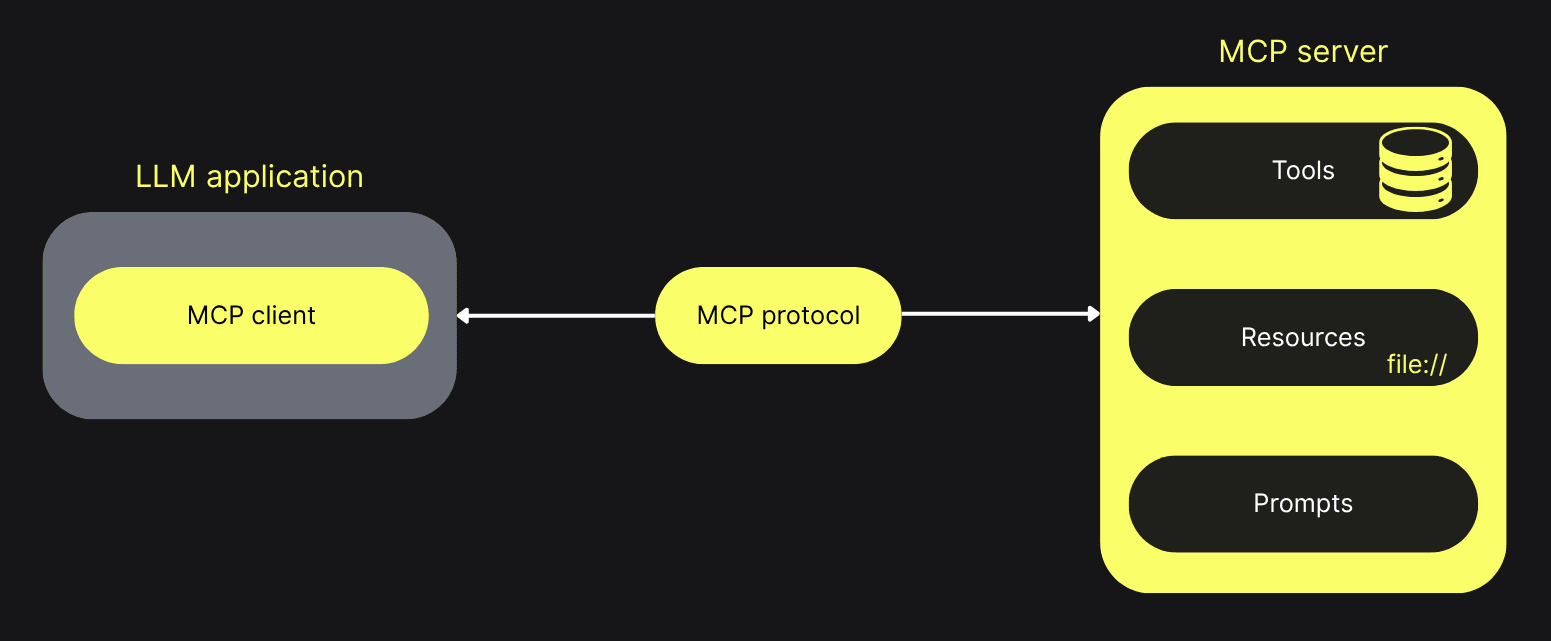
You can find community-maintained collections of MCP clients and MCP servers on GitHub.
ClickHouse MCP server
The ClickHouse MCP server lets an AI assistant discover databases and tables, inspect schemas, and run SQL queries against a ClickHouse cluster. The tools exposed by the server may vary by version, so refer to the relevant integration guide for the tool names used in its examples.
The server allows read-only queries by default. Use a dedicated ClickHouse user with only the permissions that the assistant needs.
To connect a local MCP client, see Set up the ClickHouse MCP server. For a managed remote server, see Remote MCP server in ClickHouse Cloud.