

 Set up docs MCP
You can use AWS PrivateLink to establish a secure connection between ClickPipes and a data source hosted on AWS. ClickPipes creates a reverse private endpoint (RPE) in its VPC and points it at a private endpoint service published for your data source, so traffic is never exposed to the public internet.
Supported ClickPipes data sources
ClickPipes reverse private endpoint functionality is limited to the following data source types:
- Kafka
- Postgres
- MySQL
- MongoDB
Supported AWS PrivateLink endpoint types
ClickPipes reverse private endpoint can be configured with one of the following AWS PrivateLink approaches:
VPC resource
Your VPC resources can be accessed in ClickPipes using PrivateLink. This approach doesn’t require setting up a load balancer in front of your data source.
Resource configuration can be targeted with a specific host or RDS cluster ARN.
It’s the preferred choice for Postgres CDC ingesting data from an RDS cluster.
To set up PrivateLink with VPC resource:
- Create a resource gateway
- Create a resource configuration
- Create a resource share
Create a resource gateway
Resource gateway is the point that receives traffic for specified resources in your VPC.
You can create a resource gateway from the AWS console or with the following command:
aws vpc-lattice create-resource-gateway \
    --vpc-identifier <VPC_ID> \
    --subnet-ids <SUBNET_IDS> \
    --security-group-ids <SG_IDs> \
    --name <RESOURCE_GATEWAY_NAME>
The output will contain a resource gateway id, which you will need for the next step.
Before you can proceed, you’ll need to wait for the resource gateway to enter into an Active state. You can check the state by running the following command:
aws vpc-lattice get-resource-gateway \
    --resource-gateway-identifier <RESOURCE_GATEWAY_ID>
Create a VPC Resource-Configuration
Resource-Configuration is associated with resource gateway to make your resource accessible.
You can create a Resource-Configuration from the AWS console or with the following command:
aws vpc-lattice create-resource-configuration \
    --resource-gateway-identifier <RESOURCE_GATEWAY_ID> \
    --type <RESOURCE_CONFIGURATION_TYPE> \
    --resource-configuration-definition <RESOURCE_CONFIGURATION_DEFINITION> \
    --name <RESOURCE_CONFIGURATION_NAME>
The simplest resource configuration type is a single Resource-Configuration. You can configure with the ARN directly, or share an IP address or a domain name that is publicly resolvable.
For example, to configure with the ARN of an RDS Cluster:
aws vpc-lattice create-resource-configuration \
    --name my-rds-cluster-config \
    --type ARN \
    --resource-gateway-identifier rgw-0bba03f3d56060135 \
--resource-configuration-definition 'arnResource={arn=arn:aws:rds:us-east-1:123456789012:cluster:my-rds-cluster}'The output will contain a Resource-Configuration ARN, which you will need for the next step. It will also contain a Resource-Configuration ID, which you will need to set up a ClickPipe connection with VPC resource.
MSK multi-VPC connectivity
The Multi-VPC connectivity is a built-in feature of AWS MSK that allows you to connect multiple VPCs to a single MSK cluster. Private DNS support is out of the box and doesn’t require any additional configuration. Cross-region isn’t supported.
It is a recommended option for ClickPipes for MSK. See the getting started guide for more details.
Follow our MSK setup guide for ClickPipes to learn how to set up the connection.
VPC endpoint service
VPC endpoint service is another approach to share your data source with ClickPipes. It requires setting up a NLB (Network Load Balancer) in front of your data source and configuring the VPC endpoint service to use the NLB.
VPC endpoint service can be configured with a private DNS, that will be accessible in a ClickPipes VPC. AWS PrivateLink managed private DNS is not always a viable option:
- you don’t own the domain name of your data source, so you can’t verify it with AWS
- the provider requires consumers to manage DNS resolution, as Confluent Cloud does In these cases, see Custom private DNS.
It’s a preferred choice for:
- Any on-premises Kafka setup that requires private DNS support
- Confluent Cloud private connectivity
- Cross-region connectivity for Postgres CDC
- Cross-region connectivity for MSK clusters
See the getting started guide for more details.
For MSK clusters, see AWS PrivateLink VPC endpoint service for MSK cluster for a broker-per-endpoint-service setup that uses custom private DNS names.
Custom private DNS
AWS PrivateLink provides managed private DNS for VPC endpoint services with a verified domain. Some services require each consumer to manage DNS resolution in their own VPC, e.g., Confluent Cloud requires consumers to resolve broker hostnames to the PrivateLink endpoint.
For these cases, ClickPipes supports attaching custom private DNS names to a reverse private endpoint. ClickPipes resolves these names to the endpoint’s private addresses, so your data source can be reached by its own hostname over private connectivity.
Custom private DNS complements managed private DNS — it doesn’t replace it. If your PrivateLink service already provides private DNS names, you don’t need custom names.
Custom private DNS names are supported for the VPC endpoint service and VPC resource endpoint types. MSK multi-VPC provides managed private DNS out-of-the-box and doesn’t support custom names.
The following rules apply to custom private DNS names:
- Exact names (
kafka.internal.example.com) and wildcard names (*.example.com) are supported. A wildcard matches a single DNS label — for example,*.abcde12345.us-east-1.aws.confluent.cloudmatchesb0-lkc123.abcde12345.us-east-1.aws.confluent.cloud. - Names must be unique across all reverse private endpoints of a ClickHouse service, including overlaps between wildcard and exact names.
- Names under reserved suffixes (e.g.,
local,localhost,internal,corp,private) are rejected.
To configure custom private DNS names:
- In the ClickHouse Cloud console, fill in the
Custom private DNS namefield when creating a reverse private endpoint. The field is shown once the feature is enabled for your service. - With OpenAPI, set
customPrivateDnsMappingswhen creating a reverse private endpoint, or update an existing endpoint with aPATCHrequest. Updates replace the full list of mappings; an empty list removes all custom names. - With Terraform, use the
clickhouse_clickpipes_reverse_private_endpoint_custom_private_dnsresource to manage mappings on an existing reverse private endpoint.
Creating a ClickPipe with reverse private endpoint
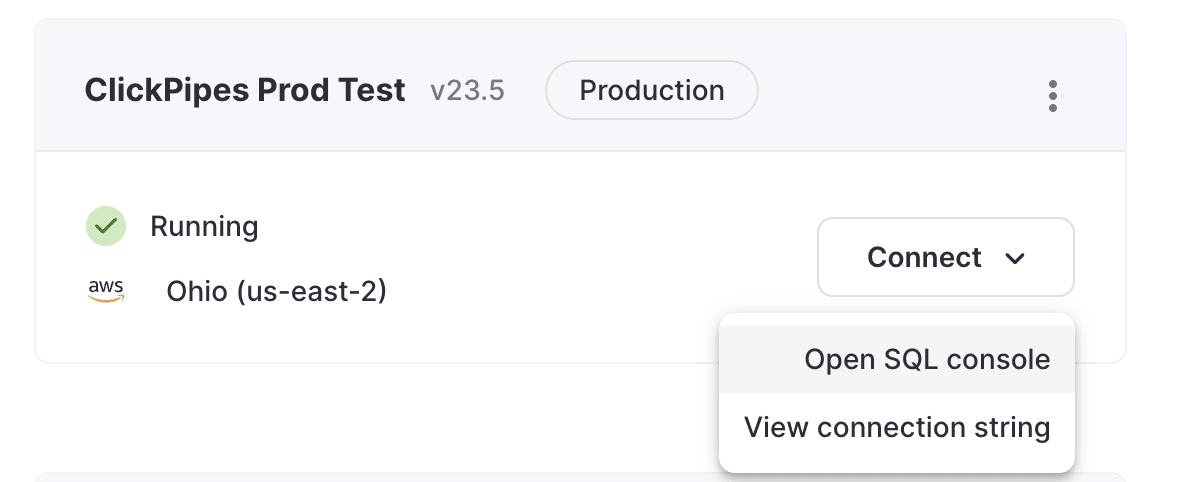
- Access the SQL Console for your ClickHouse Cloud Service.
- Select the
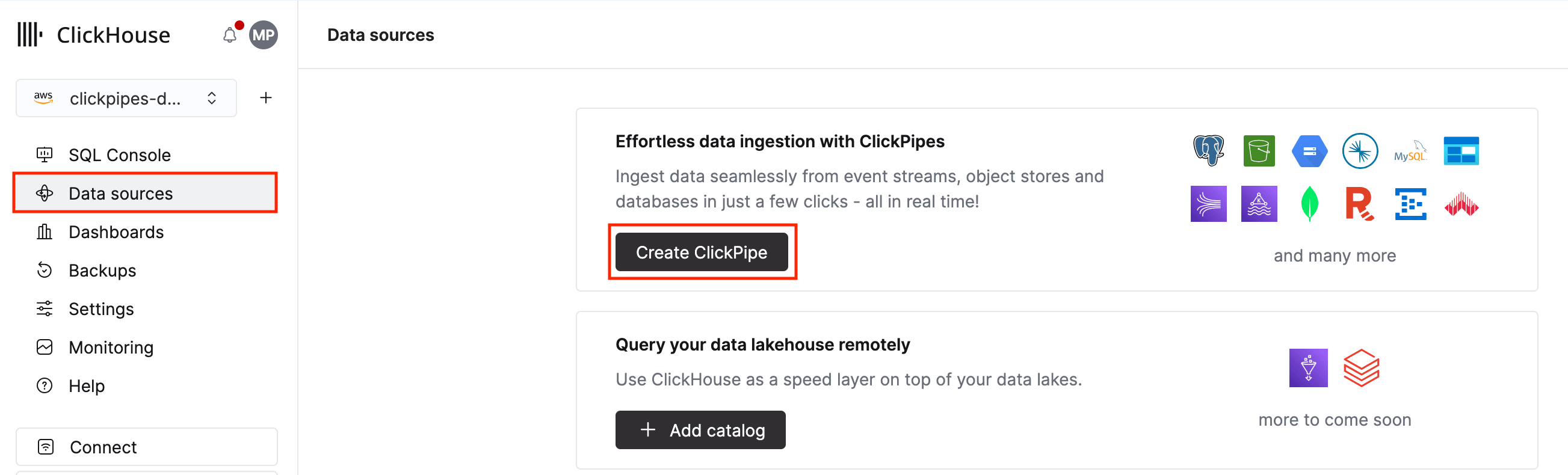
Data Sourcesbutton on the left-side menu and click on “Set up a ClickPipe”
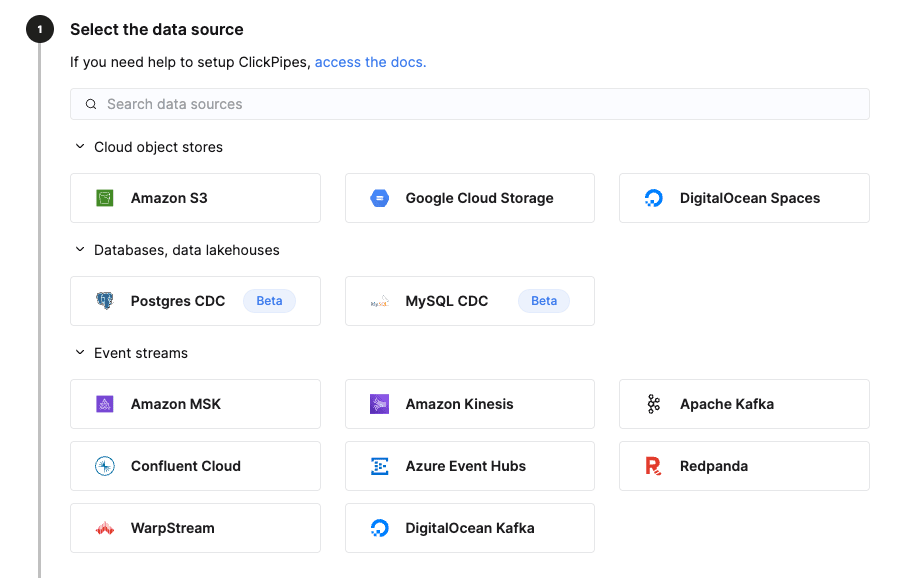
- Select either Kafka or Postgres as a data source.
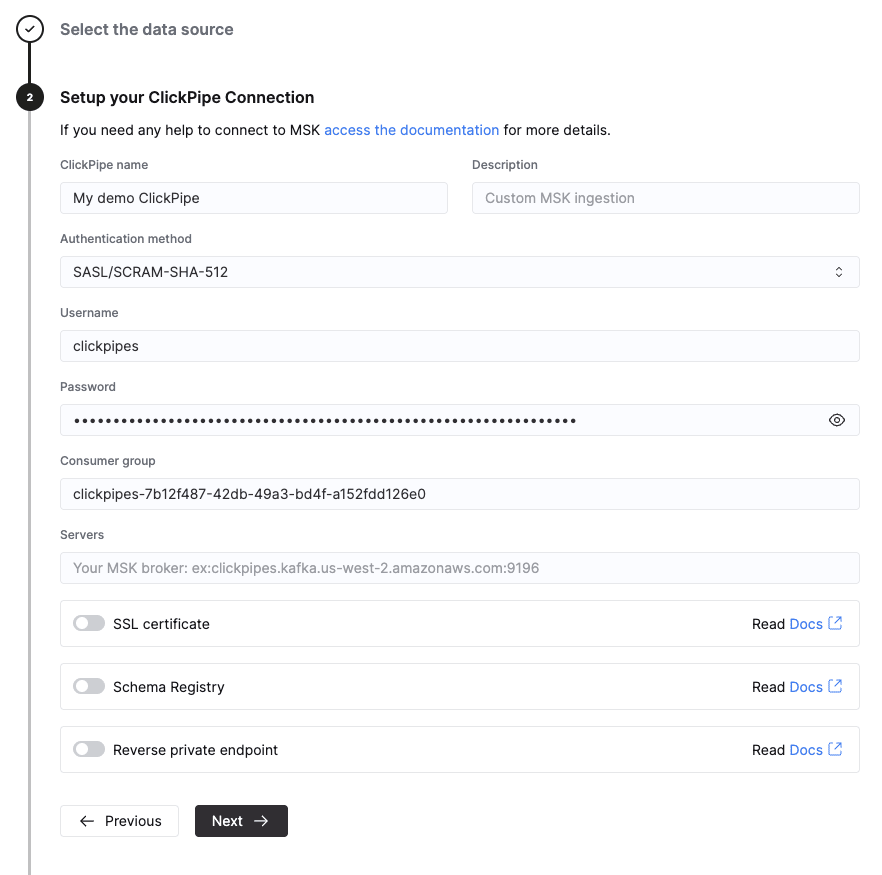
- Select the
Reverse private endpointoption.
- Select any of existing reverse private endpoints or create a new one.
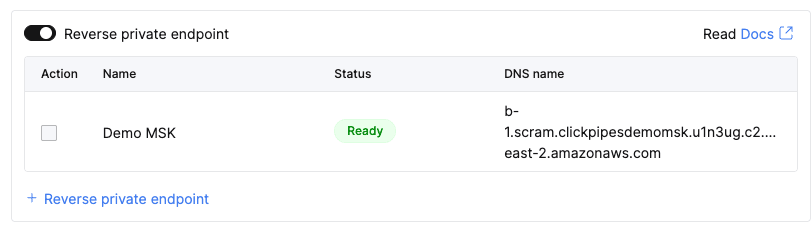
- Provide the required parameters for the selected endpoint type.
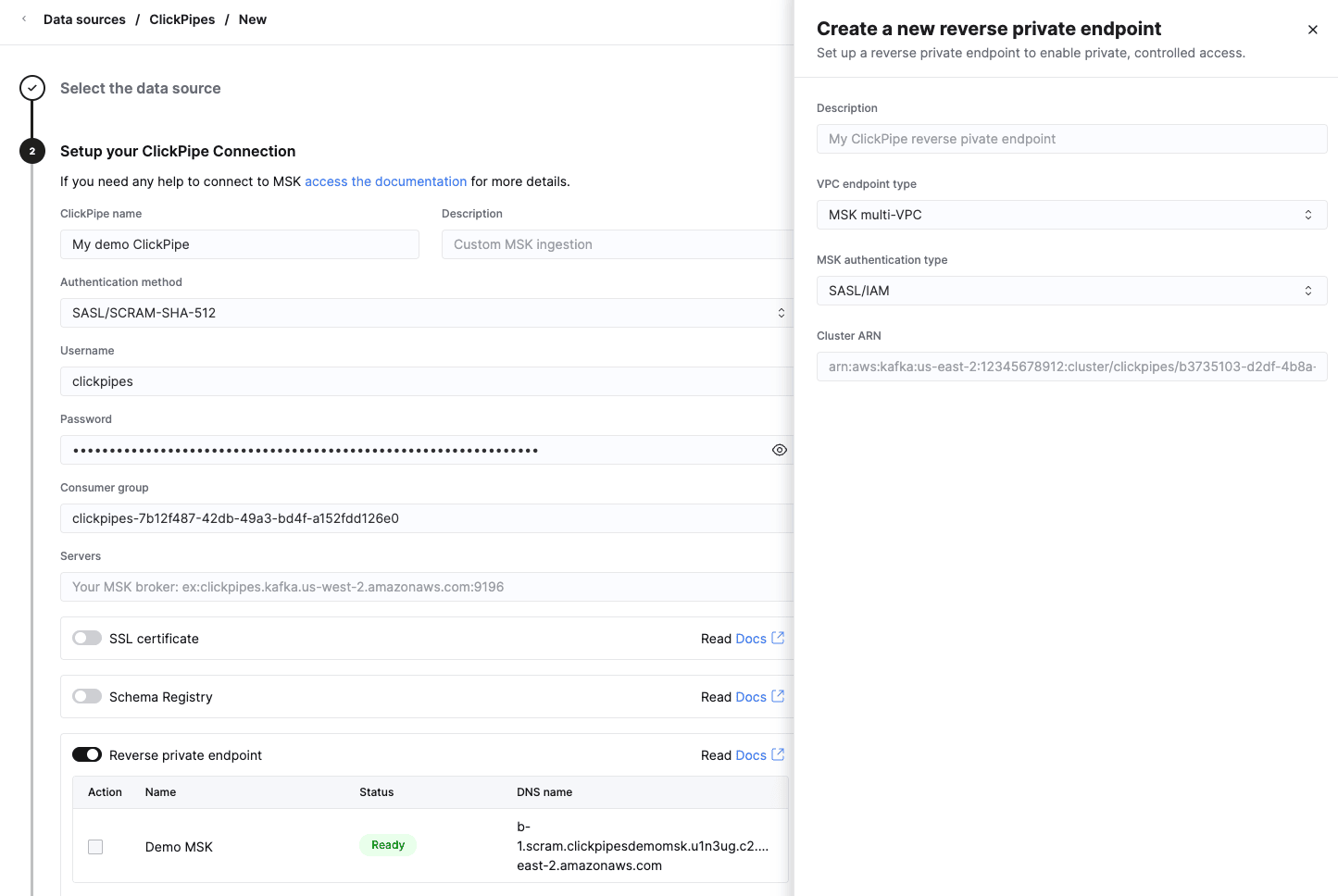
- For VPC resource, provide the configuration share ARN and configuration ID.
- For MSK multi-VPC, provide the cluster ARN and authentication method used with a created endpoint.
- For VPC endpoint service, provide the service name.
- Optionally, provide a custom private DNS name.
-
Click on
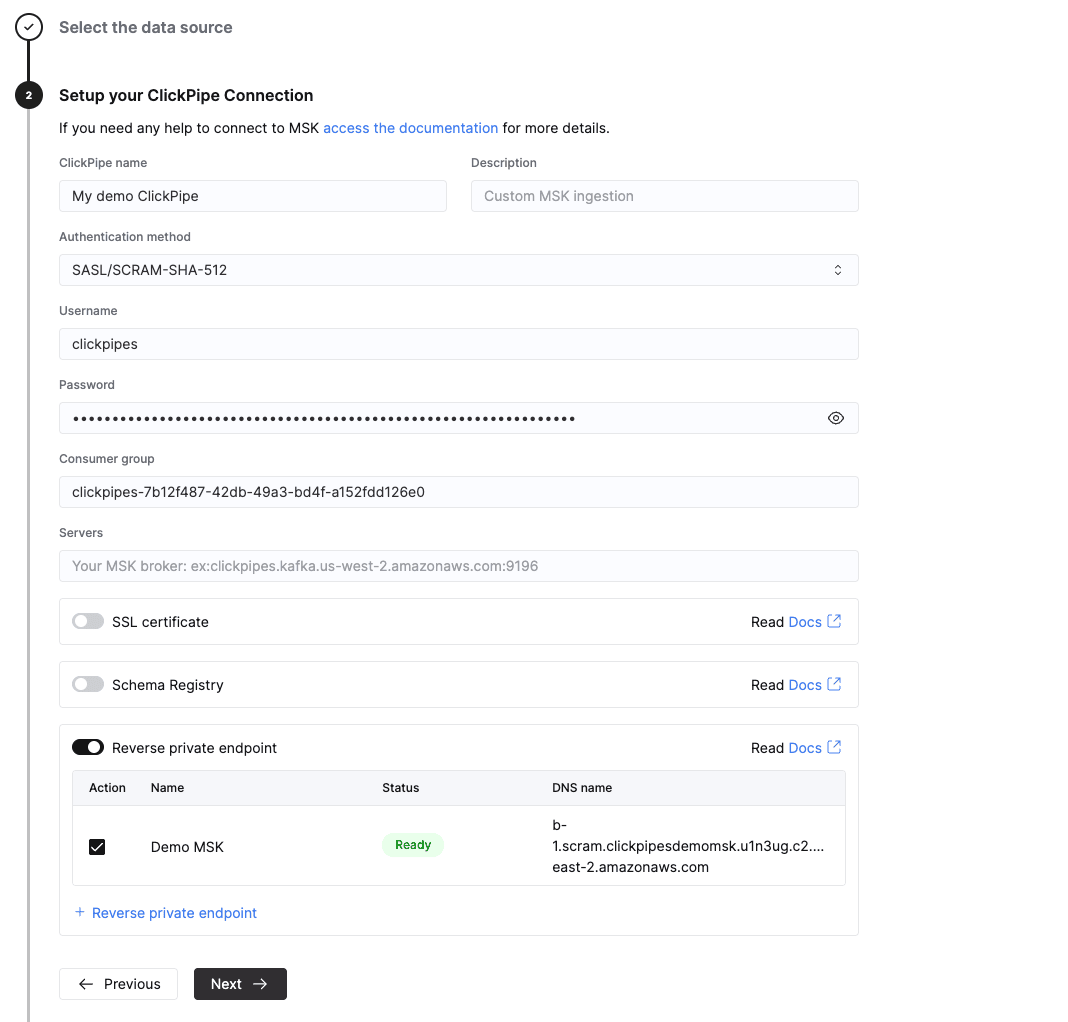
Createand wait for the reverse private endpoint to be ready.If you’re creating a new endpoint, it will take some time to set up the endpoint. The page will refresh automatically once the endpoint is ready. VPC endpoint service might require accepting the connection request in your AWS console.
-
Once the endpoint is ready, you can use a DNS name to connect to the data source.
On a list of endpoints, you can see the DNS name for the available endpoint. It can be an internally ClickPipes provisioned DNS name, a private DNS name supplied by a PrivateLink service, or a custom private DNS name. DNS name isn’t a complete network address. Add the port according to the data source.
MSK connection string can be accessed in the AWS console.
To see a full list of DNS names, access it in the cloud service settings.
Managing reverse private endpoints
You can manage existing reverse private endpoints in the ClickHouse Cloud service settings:
-
On a sidebar find the
Settingsbutton and click on it.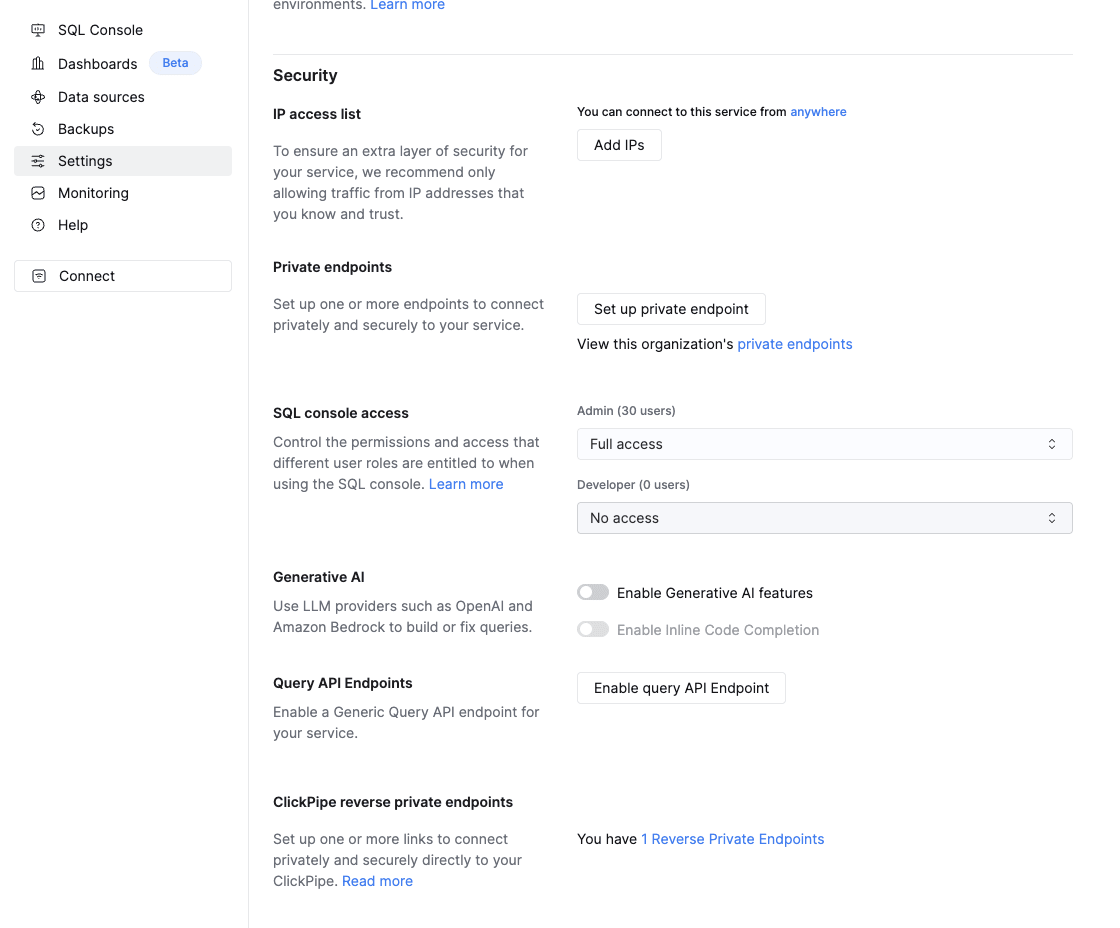
-
Click on
Reverse private endpointsin aClickPipe reverse private endpointssection.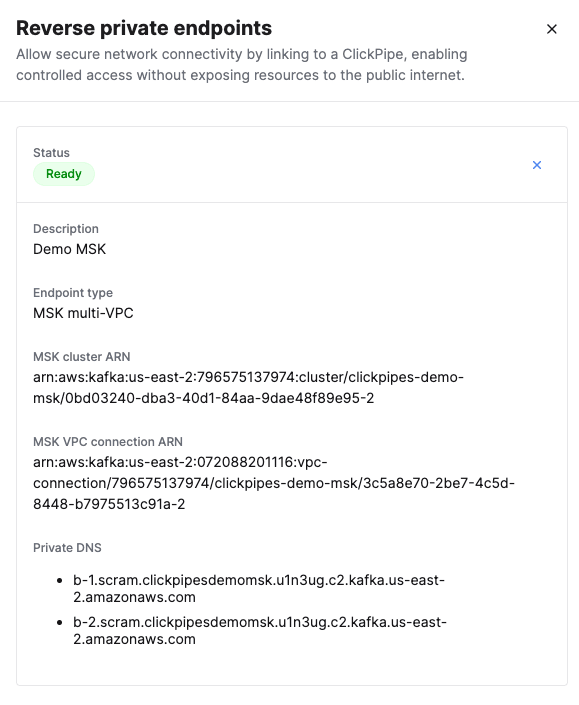
Reverse private endpoint extended information is shown in the flyout.
An endpoint can’t be edited after you create it. You can delete one by clicking the
×on the endpoint and confirming — deletion is permanent and breaks any ClickPipe currently using that endpoint.
Supported AWS regions
AWS PrivateLink support is limited to specific AWS regions for ClickPipes. Please refer to the ClickPipes regions list to see the available regions.
This restriction doesn’t apply to PrivateLink VPC endpoint service with a cross-region connectivity enabled.
Limitations
AWS PrivateLink endpoints for ClickPipes created in ClickHouse Cloud aren’t guaranteed to be created in the same AWS region as the ClickHouse Cloud service.
Currently, only VPC endpoint service supports cross-region connectivity.
Private endpoints are linked to a specific ClickHouse service and aren’t transferable between services. Multiple ClickPipes for a single ClickHouse service can reuse the same endpoint.
AWS MSK supports only one PrivateLink (VPC endpoint) per MSK cluster per authentication type (SASL_IAM or SASL_SCRAM). As a result, multiple ClickHouse Cloud services or organizations cannot create separate PrivateLink connections to the same MSK cluster using the same auth type.
Automatic cleanup of inactive endpoints
Reverse private endpoints that remain in a terminal state are automatically removed after a defined grace period. This ensures unused or misconfigured endpoints do not persist indefinitely.
The following grace periods apply based on the endpoint status:
| Status | Grace Period | Description |
|---|---|---|
| Failed | 7 days | The endpoint encountered an error during provisioning. |
| Pending Acceptance | 1 day | The endpoint connection has not been accepted by the service owner. |
| Rejected | 1 day | The endpoint connection was rejected by the service owner. |
| Expired | Immediate | The endpoint has already expired and is removed promptly. |
Once the grace period elapses, the endpoint and all associated resources are automatically deleted.
To prevent automatic removal, resolve the underlying issue before the grace period expires. For example, accept a pending connection request in your AWS console, or recreate the endpoint if it has entered a failed state.